
A long channel list doesn’t tell you whether an IPTV service is legal in the US. IPTV means television delivered over the internet, but the term alone doesn’t establish a service’s rights to distribute content. Before you buy an IPTV subscription, assess legality separately from the playlist, library, and subscription term.
Before choosing, compare channel selection, on-demand titles, setup steps, and subscription terms against your viewing habits. These details help you judge how well a service may fit, but they don’t answer every question about legality or value.
This guide covers what US viewers should consider about IPTV legality, live and on-demand libraries, playlist setup, and subscription terms. It also explains how to weigh plan duration and other factors when deciding where to buy an IPTV subscription.
Key Takeaways
- Separate the technology from the service’s content rights when assessing whether an IPTV option is appropriate for US viewing.
- Look beyond headline library totals and focus on whether the live channels and on-demand titles fit your viewing habits.
- Compare plan durations against how long you expect to use the service, not just the appeal of a longer term.
- Review playlist setup, compatible devices, and simultaneous-stream needs together to see how smoothly IPTV can fit your household routine.
Is an IPTV Subscription Legal in the USA?
In the US, legitimate IPTV options include broadcaster apps and authorized pay-TV streaming services with rights to distribute their programming. An app, device compatibility, or large channel list alone does not establish those rights.
The U.S. District Court for the Northern District of Texas described services in a filing that, after payment, linked customers to a web player or directed them to download a media-player application. This describes how access may be delivered, but doesn’t establish whether the programming is authorized. Assess distribution rights separately from setup steps.
Device compatibility determines where you can watch, not whether a service is legitimate. IPTV services may support smart TVs, Firestick devices, or mobile devices. Before setting up a playlist, identify your intended device and confirm the service supports it. A compatible IPTV player can display playlist content, but it is separate from the provider’s rights to stream live channels.
Also consider simultaneous streams. A subscription may limit how many devices can play at once, even if its app works on several devices. For example, a household watching on a living-room smart TV and a phone at the same time needs a plan that permits both streams. Some plans are platform-specific, while others may support multiple compatible devices. Read the connection terms before choosing.
Long-term device-and-subscription bundles combine equipment with access for an extended term. Separate the hardware cost from the subscription commitment, and confirm which devices and viewing period the bundle covers. A bundle may simplify setup, but it doesn’t replace checking content authorization or simultaneous-stream limits.
There’s no single internet speed recommendation that suits every IPTV stream. Requirements depend on video quality, network congestion, and how many other devices are using bandwidth. To assess playback, test your preferred device while other household devices are active. If live channels buffer, reduce competing network use or improve the connection before changing IPTV player settings.
Legitimate IPTV options in the US include broadcaster apps and authorized pay-TV streaming services with rights to distribute their programming.
Live channel and on-demand library sizes
Library totals can help compare IPTV listings, but they don’t show whether the channels you want are easy to find. Review the live TV lineup and on-demand catalogue separately.
Live Channel Counts
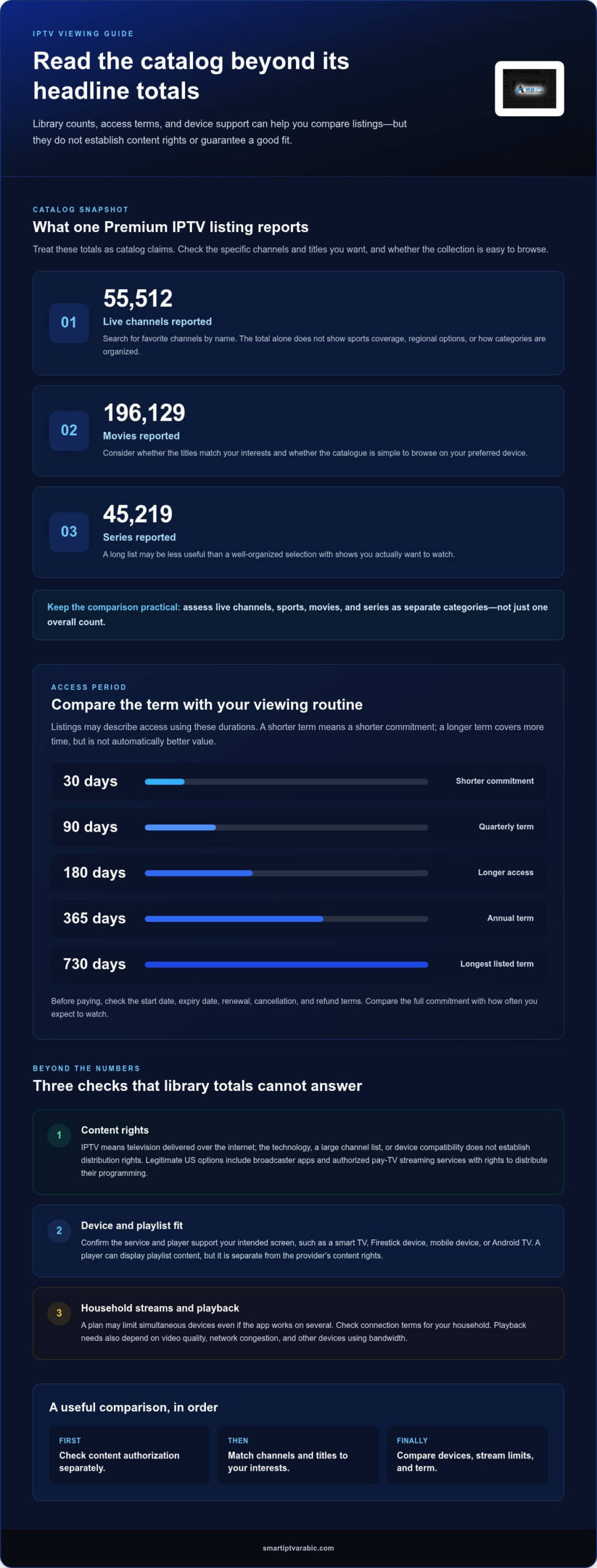
A Premium IPTV plan listing reports 55,512 live channels. Treat that number as a catalog claim, then focus on the channels you actually watch. A large total doesn’t tell you how much sports coverage is available, whether regional options suit you, or how clearly categories are organized. Search for favorite channels by name and review the lineup before choosing. That gives the headline number useful context.
On-Demand Library Sizes
The same Premium IPTV plan listing reports 196,129 movies and 45,219 series. Those totals describe the claimed video-on-demand library, not how relevant every title will be to your household. Consider whether movies and series match your interests, and whether the catalogue is easy to browse on your compatible device. A long list can be less useful than a smaller, well-organized selection with titles you want to watch instantly.
Channels, Sports, and On-Demand Content
Services differ in their live channels, sports, and on-demand titles. Start with the programs you watch most, then compare those categories instead of relying on one overall count. For sports, check whether the events and channels you follow are listed. For movies and series, consider how relevant the catalogue is and how easy it is to browse. This helps answer the practical question: which service fits your viewing habits?
Device support also affects how you use a library. Check that the IPTV player works with your preferred platform, such as Android TV, and that its menus are easy to navigate. A stable viewing experience depends on more than library size. If titles are hard to find or playback options are unclear, customer support can explain the service’s navigation and features.
Compare the categories and titles you care about before deciding. Treat total counts as a starting point, not the whole comparison.
IPTV subscription plan prices and durations
Plan duration determines how long access lasts and how much you commit upfront. Monthly, quarterly, and annual plans suit different viewing habits, from following live events to watching series throughout the year. Before you buy an IPTV subscription, consider how long you expect to use it.
Compare the access period before comparing headline prices. IPTV listings may describe terms as 30, 90, 180, 365, or 730 days. A 30-day term gives you a shorter commitment; a 365-day term covers a longer viewing period. Check the start date, expiry date, and renewal terms so you know when access ends.
For an IPTV service, the plan cost depends on the case and is given after a quote request; plan duration, supported devices, and viewing needs shape it. Compare the full term against how often you expect to watch, rather than assuming a longer plan automatically offers better value. Also separate the subscription from any smart TVs, Firestick devices, or player you already own.
Match the plan to your routine. If you plan to buy an IPTV subscription for a specific series or seasonal events, consider whether a shorter term suits your viewing period. If you expect to watch regularly throughout the year, weigh an annual commitment against your expected use. Device compatibility matters too: the plan won’t help if the IPTV service or player doesn’t support your preferred screen.
A subscription period alone doesn’t explain whether a contract applies. Before paying, read the written terms for renewal, cancellation, and refunds, and note how they relate to your selected duration.
Choose based on three practical factors: how long you want access, which devices you’ll use, and how often you’ll watch. This helps you avoid a plan that lasts longer than your viewing needs.
What is IPTV and how does a subscription work?
IPTV stands for Internet Protocol television, according to the U.S. Government Publishing Office. It delivers television programming through an internet connection rather than traditional broadcast delivery. For example, viewers can open a compatible player on a television or mobile device and select available live programming or on-demand titles.
A subscription gives an account access to a service for a selected term. Monthly, quarterly, and annual plans differ in how long access lasts. The subscription doesn’t replace the player or internet connection. Think of the player as the viewing app, the subscription as account access, and the internet connection as the route that carries the video.
Use these steps to get started:
- Choose a subscription term based on how long you expect to watch.
- Identify the device you’ll use, such as a smart TV, Firestick, or phone.
- Install a compatible IPTV player, or open the service’s web player when provided.
- Enter the access details or playlist information supplied for your account.
- Open a channel or on-demand title, then test playback and navigation.
Playlist setup connects the player to available programming. A playlist may organize channels into categories, while the player provides menus for browsing and playback. Follow the instructions for your device. For example, a television app may ask for account details, while a web player opens in a browser.
Keep the subscription term and supported device in mind as you set up. If you plan to switch from a living-room television to a phone, use a device supported by the player and account. Choose a suitable IPTV subscription plan and follow its setup steps to begin watching.
Best IPTV Service: IPTV service
Best IPTV Service offers IPTV service for viewers ready to choose a subscription after learning how IPTV works. Its monthly, quarterly, and annual subscription plans let you select a term based on how long you expect to watch and the commitment that suits your routine.
Use this guide’s comparison points: consider content rights, library fit, compatible devices, and setup steps before deciding. These factors help match an IPTV subscription to your viewing needs instead of relying on a headline claim.
Turn to Best IPTV Service when you’re ready to select an IPTV plan and duration. For the next step, visit smartiptvarabic.com.
Make Your Next Viewing Choice With Confidence
Turn your priorities into a simple viewing plan: decide what you want to watch, where you’ll watch, and how long you want access. Then you can buy an IPTV subscription with a clearer sense of what fits your routine, rather than choosing on impulse.
Best IPTV Service offers monthly, quarterly, and annual IPTV subscription plans. Choose the term that matches your intended use, and consider your device and playlist setup as you get ready to watch. A thoughtful choice helps set expectations that suit your household.
Ready to explore your next step? Contact Best IPTV Service for help and find the subscription option that fits your viewing plans. Take your time, choose what works for you, and enjoy building a setup around the entertainment you want.
Frequently Asked Questions
How many devices can I use at the same time?
The number of simultaneous streams depends on a subscription’s connection allowance, not just how many devices can install a player. A Premium plan listing specifies one connection, so it supports one active stream at a time. If people in your household watch on separate screens simultaneously, review the plan’s connection terms and distinguish concurrent viewing from switching between devices.
Need IPTV help?
For help choosing a subscription, contact Best IPTV Service through its website. Consider your preferred viewing term and the devices you plan to use to make the discussion more focused. Best IPTV Service offers monthly, quarterly, and annual IPTV subscription plans for different commitment periods.
What countries support the IPTV streaming platform?
Best IPTV Service offers worldwide coverage for its streaming subscriptions. Access requires an active subscription and a compatible device that can connect to the service. If you travel, consider the network you’ll use and whether your usual device can run the player. Worldwide coverage alone doesn’t indicate which individual channels or titles are available in each location.
Will I get movies and shows on demand?
IPTV subscriptions may include video-on-demand alongside live programming, but available titles depend on the service’s library. For a practical check, search for a specific movie or series you want to watch, then look for seasons, episode labels, and language options. This helps you assess whether the catalogue suits your preferences instead of relying on its overall size.
How much does a legal IPTV subscription cost in the United States?
There’s no single standard price for every legal IPTV subscription in the United States. Costs vary by service, plan duration, and included content or access. A higher price alone doesn’t establish that a service has distribution rights. Compare the written terms, billing period, renewal conditions, and content authorization separately.
Which devices support IPTV subscriptions?
IPTV subscriptions can work on supported smart TVs, Firestick devices, and mobile devices. Compatibility depends on whether the service’s player or app runs on your device and operating system. Before setup, identify the screen you plan to use, such as a living-room television or a phone while travelling. An active subscription provides access credentials, not physical hardware.



Leave A Comment