

A free trial can tell you more than a glossy channel list ever will. Trial access isn’t automatic, so look for IPTV trials lasting 7-30 days. Finding the best IPTV service means judging the viewing experience before you commit, not just comparing a headline price.
It makes sense to look for a low-risk way to test picture quality, playback, and whether a service works on the screens you use. This guide explains how content rights and VPN use affect your decision, what multi-screen access means, and how subscription terms shape value. It also covers why a listed price alone may not tell you what a plan includes, and what to weigh before choosing. Focus on the details that matter in everyday viewing: content rights, device compatibility, stream quality, simultaneous viewing, and renewal terms. That will help you compare options and decide what suits your household, budget, and viewing habits.
Key Takeaways
- Separate an IPTV player from the content source: the player itself doesn’t establish whether the streams it accesses are authorized.
- Compare multi-screen options against how people in your household actually watch, and consider picture-in-picture separately from simultaneous streams.
- Use a trial to assess playback, device fit, and renewal terms before choosing a subscription period.
- For U.S. options, weigh content rights and viewing needs alongside picture quality and plan flexibility, rather than relying on a service’s name alone.
1. IPTV legality and VPN use
Separate the IPTV player from the programs it plays. IPTV players are legal to install and use because they don’t host or provide content. That alone doesn’t establish whether a particular stream is authorized. Content rights depend on the source and its permission to distribute each program. A VPN changes how your internet traffic is routed; it doesn’t change those rights. Use a VPN according to your privacy preferences, not as proof that a stream is lawful.
Channel choice also needs a closer look. No single lineup is best for every viewer: compare the specific news, sports, and entertainment channels you watch. Check whether the service identifies its content sources and rights clearly. Recommendations framed as applying as of May 2024 are a dated snapshot, so use them as context rather than a current ranking.
For local broadcast channels in the United States, availability can vary by ZIP code because local stations and distribution rights differ by market. Enter your ZIP code in a service’s channel lookup, then confirm that your local network affiliates are listed before choosing a plan. A national channel list may not show what’s available at your address.
For picture quality, look for options supporting 1080p or 4K and compare the actual channels you want to watch. Assess DVR storage, recording limits, and on-demand access as separate features, since they can differ between plans. An uptime target of 99% or higher is another useful comparison point, but picture quality and service continuity are distinct considerations.
Reliable streaming depends on your internet connection, router, streaming device, video resolution, and the number of active screens. Higher resolution and simultaneous streams put more demand on your connection. Use a compatible TV, streaming device, or computer, and position the router for a steady signal. If playback buffers, test one screen near the router before changing settings or judging the service.
2. Multi-screen and picture-in-picture features
First, distinguish device access from simultaneous viewing. A service might let you sign in on a TV and a phone while limiting how many streams can play at once. For a household, that difference matters: one person watching a film on the living-room TV while another watches a game on a tablet may count as two active streams. Read the plan terms for both device and concurrent-stream limits.
Roku, Fire TV, Apple TV, smart TVs, and mobile devices use different app platforms. IPTV services work on these devices when their app supports the platform or another compatible viewing method is available. Before subscribing, identify your device model, look for the service’s app in its supported app store, and confirm that you can use the same account on your preferred screens.
Picture-in-picture is different from multi-screen streaming. It usually keeps one video in a small floating window while you use another app on the same device. For example, you might follow a news broadcast while checking a message. The feature depends on the device’s operating system and player app, so a service that supports several screens won’t necessarily offer picture-in-picture on every screen.
Test your actual routine. Open a live channel on the main TV, then start a second stream on a phone or tablet. Note whether both play, whether either pauses, and whether switching channels disrupts playback. Repeat with the devices your household uses most, such as an Apple TV in the lounge and a Fire TV in a bedroom.
Also consider shared internet use. A video call, game download, or another high-quality stream can compete with IPTV for connection capacity. If picture-in-picture stutters, close other video apps first; if a second screen buffers, test it near the router. Choose an IPTV setup around the screens you use together, then explore IPTV service options that suit your viewing habits.
3. Player subscription prices and free trials
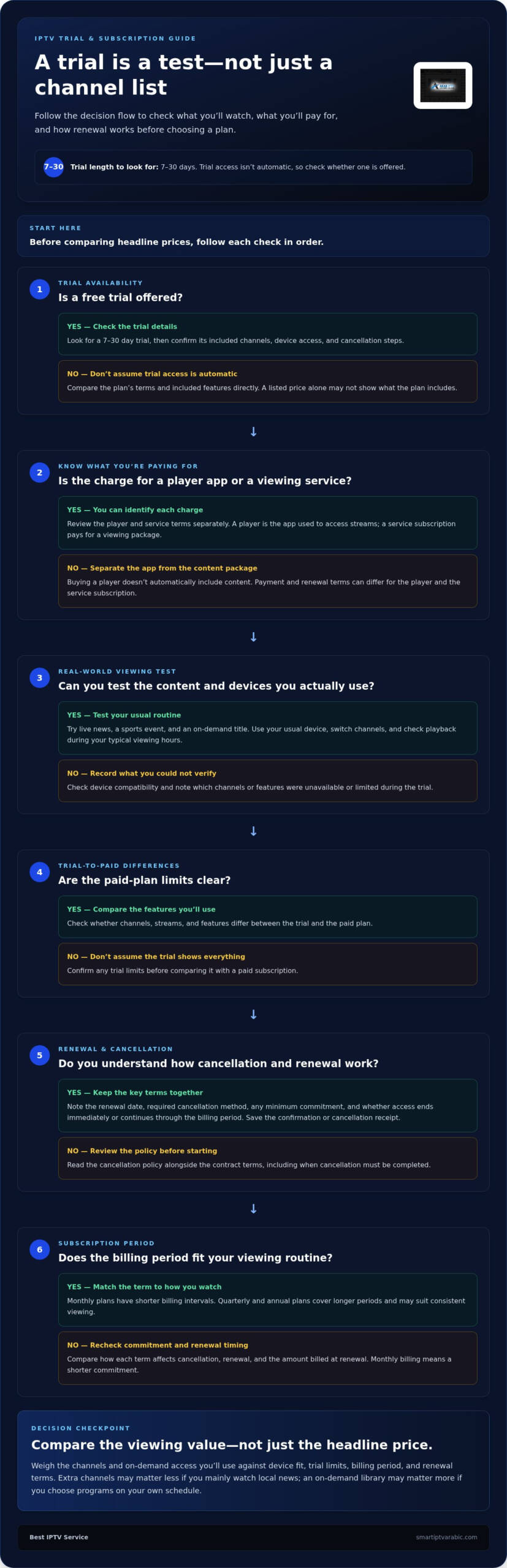
Compare IPTV trials by their length, included channels, device access, and cancellation steps. Look for trial periods lasting 7-30 days, then test the same features you expect to use after subscribing. Check whether the trial converts automatically and when cancellation must be completed.
Distinguish the player from the service subscription. A player is the app used to access streams; an IPTV subscription pays for a service’s viewing package. Their payment terms can differ, so review each charge and renewal separately. Buying a player doesn’t automatically include access to content.
Compare plans by billing period and included features, not just the headline. Monthly plans have shorter billing intervals, while quarterly and annual plans cover longer periods. Check how each term affects renewal timing, cancellation, and the amount billed at renewal. Longer billing periods may suit consistent viewing, while monthly billing means a shorter commitment.
Use a trial as a practical test, not just a preview of the channel menu. Try live news, a sports event, and an on-demand title. Test your usual device, switch channels, and see whether playback works during your typical viewing hours. Note any limits on channels, streams, or features that differ from the paid plan.
Before starting, read the cancellation policy alongside the contract terms. Note the renewal date, required cancellation method, any minimum commitment, and whether access ends immediately or continues through the billing period. Save the confirmation message or cancellation receipt. These steps help you compare free trials, cancellation policies, and contract requirements without overlooking a renewal condition.
Finally, compare the value of the subscription features you’ll actually use. A plan with extra channels may not suit someone who mainly watches local news, while an on-demand library matters more to viewers who choose programs on their own schedule. Match the billing period and included features to your viewing routine.
4. What are the best legal IPTV services in the United States in 2026?
There isn’t one lineup for every U.S. viewer. Start by separating the IPTV player from the content source: players are legal to install and use because they don’t host or provide content. To compare services, focus on who supplies the channels and whether content rights are clearly explained. A VPN changes how your internet traffic is routed, but it doesn’t establish those rights.
Next, match the lineup to your viewing habits. A household following national news, local broadcasts, and live sports needs different channels from someone focused on entertainment and on-demand programs. Check the channel list for the specific networks you watch, then look for local broadcast availability by ZIP code. Treat recommendations dated May 2024 as a past snapshot, not a current 2026 ranking.
Picture quality and reliability are useful comparison points, but they don’t settle the choice alone. Look for services offering 1080p or 4K where available, and consider an uptime target of 99% or higher. Also compare the actual channels and features you’ll use. A high-resolution stream matters less if your preferred programs aren’t in the lineup.
Use a simple review process before choosing. Read the content and channel descriptions, search for local stations by ZIP code, and compare device and simultaneous-stream limits. Then review trial access, renewal terms, and cancellation steps. These checks help you distinguish a service that fits your routine from one that only looks appealing in a headline.
The best legal choice for your home is the option whose content source, channels, and viewing terms meet your needs. If you’re ready to explore an IPTV subscription, browse IPTV service options and compare the plan details with your viewing priorities.
The best choice depends on your household’s viewing habits and the specific channels, local stations, devices, and viewing terms you need. Prioritize services that clearly explain their content sources and rights, then compare plans and reliability.
Choose based on the networks you watch. Compare national news, local broadcasts, live sports, entertainment, and on-demand options with each service’s channel list. Check local station availability by ZIP code, then compare the features and viewing limits that matter to your household.
Best IPTV Service: IPTV service
Best IPTV Service offers IPTV subscriptions for viewers ready to choose a plan after considering their viewing needs. Monthly, quarterly, and annual plans provide different billing periods. Use your channel and device priorities to decide which suits you. Matching a plan to your routine is a practical way to find the best IPTV service for you.
Before choosing the best IPTV service for your household, consider how often you watch and which screens you use. Compare the subscription plans with those habits, then choose a billing period that suits your preferences. Clear priorities make the next step easier.
For details, you’re welcome to visit Best IPTV Service online.
Make Your Next Viewing Choice With Confidence
Let your everyday routine guide your decision. Think about what you watch, where you watch, and how often you share a screen. The best IPTV service for your household should fit those habits, not just offer a long feature list.
Before you choose, make a short checklist of the channels you care about, the devices you use, and the subscription term you prefer. Use it to compare best IPTV service options with your real viewing needs. Clear priorities can simplify the choice and keep your attention on what matters.
When you’re ready to explore an IPTV subscription, Best IPTV Service offers monthly, quarterly, and annual plans. Consider which billing period suits your routine, then take the next step toward finding the best IPTV service for you.
Contact Best IPTV Service today to continue your search and move toward a viewing setup that feels right for you.
Frequently Asked Questions
Do you have a free trial?
Trial availability varies by IPTV service, so don’t assume every subscription includes one. Before signing up, compare a trial’s access, duration, and cancellation terms with the paid plan. A useful trial should let you test the channels and devices you care about. These details can help you decide whether the service fits your viewing routine.
How Can I Get Started?
Choose a subscription plan, complete signup, and use your account credentials on a compatible device. For example, decide whether you’ll watch on a smart TV, phone, or streaming device, then follow the service’s setup instructions. Keep your credentials handy and enter them carefully. An IPTV subscription provides streaming access, but you still need an internet connection to watch.
How Long Does It Take To Activate The Subscription?
Activation depends on when your account credentials are issued and entered into a compatible viewing setup. After receiving them, follow the sign-in instructions and check for typing errors if access doesn’t work. The device and app must also support the service. Activation is separate from purchasing equipment or arranging a home internet connection.
How much do U.S. IPTV services cost per month, including fees and add-ons?
U.S. subscription costs depend on the plan, billing period, included features, and any separately charged add-ons. For a specific subscription, the price depends on the case and is provided after a quote request. Compare the full billing terms, including renewal timing and extra charges, rather than focusing only on the monthly equivalent. No single figure applies to every service or package.
Which IPTV services support the most simultaneous streams and household devices?
Compare account device limits separately from simultaneous-stream limits, because they describe different things. A household might sign in on a living-room television, a bedroom television, and a phone, yet watch on fewer screens at once. Check the service’s stated limits and match them to your usual routine. That practical fit matters more than choosing the best IPTV service based on device count alone.
Are IPTV services legal in the United States, and how can viewers identify unauthorized providers?
IPTV players are legal to install and use because they don’t host or provide content; the content source’s distribution rights are a separate matter. Look for clear information about who supplies the channels and whether the service explains its authorization. A VPN changes how internet traffic is routed, but it doesn’t establish that a stream is authorized.


Leave A Comment